Project 3
Search Redesign
Problem
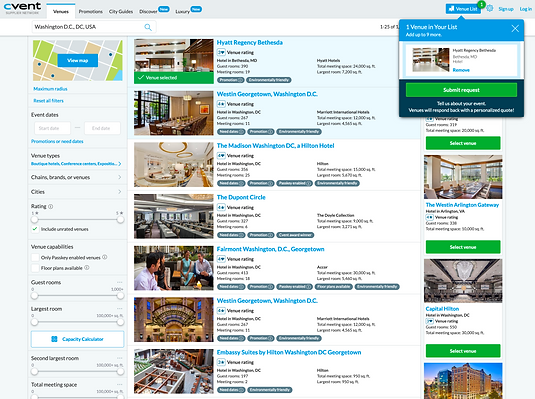
The Supplier Network Search experience was last redesigned in 2010. Since that time, additional features have been added without making holistic changes. As a result, the current interface is cluttered and dated. It's not mobile-optimized in any way.
Goal
This redesign aims to modernize the Supplier Network Search experience, make the site less overwhelming to new users, and make it easier to send RFPs. Also, make it mobile and international friendly.
My role
I partnered with the product manager and designer to get a thorough understanding of the project goals and business reasons for the redesign. I then researched competitors and studied the industry terminology to create a better Search experience for our users, both logged-in and non-logged-in planners. I decided it would be beneficial to have dynamic language based on whether they were logged-in or not, we conducted an A/B test and the results agreed that we needed different language for the different users. Throughout the project I wrote copy and iterated based on internal and external feedback.
Project 3
The Search experience for the Supplier Network is used to find venues for meetings and events and send them requests for proposals (RFPs). Venues, purchase ads to increase their visibility to meeting planners in the hopes of receiving more RFPs. Search is accessible both to logged-in users and to non-logged-in users
Highlights
Tagline Text
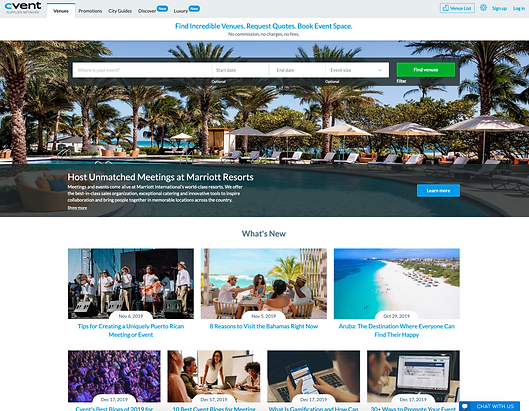
A tagline communicates an aspect of a brand in a punchy sentence or soundbite. It’s conversational and often looks like a header in font and size, but is meant to engage rather than label a page.
For this tagline, I wanted to provide relevant information without being too wordy or waste space. The text is short and immediately grabs a planners attention when they open the page.
I worked with the PMs on the project to decide what the top things a users would do. We decided on finding venues, making requests, and booking event space and needed to make sure to include Cvent doesn't charge for anything to reduce any stress or worry a user might feel.
Onboarding Text
Onboarding helps people get started using the application, either immediately while they’re discovering features, or as a short walkthrough wizard. This example is for brand new non-logged-in users.
We learned that a person may get dropped onto a venue's profile from a Google search and have no context as to what they're looking at, so we decided to add this. I wanted to be friendly, but informative. I decided to welcome the person and introduce them to the purpose of the Supplier Network. Then, because landing on a new site can be confusing, I wanted to make sure they had an idea of what they needed to do. I gave 3 simple instructions as to not intimidate or overcomplicate things.
We also provided a link on the Venue profile to review this message if they forget what to do.

Dynamic Text
Dynamic text is text that changes based on specific properties of a project. For example, we decided we needed different text for logged-in and non-logged-in users.
A logged-in planner knows the industry and understands the industry terminology used throughout the tool. They're able to quickly complete the process of finding venues and sending a request for proposal (RFP), but we discovered that non-logged-in planners don't have a clear understanding of the industry terminology. I decided to make the non-logged-in planner text much simpler to understand, instead of using the abbreviation RFP, I used request and provided more detail as to what it is. I didn't do this for the logged-in planner because this information would only slow them down and be a waste of space.